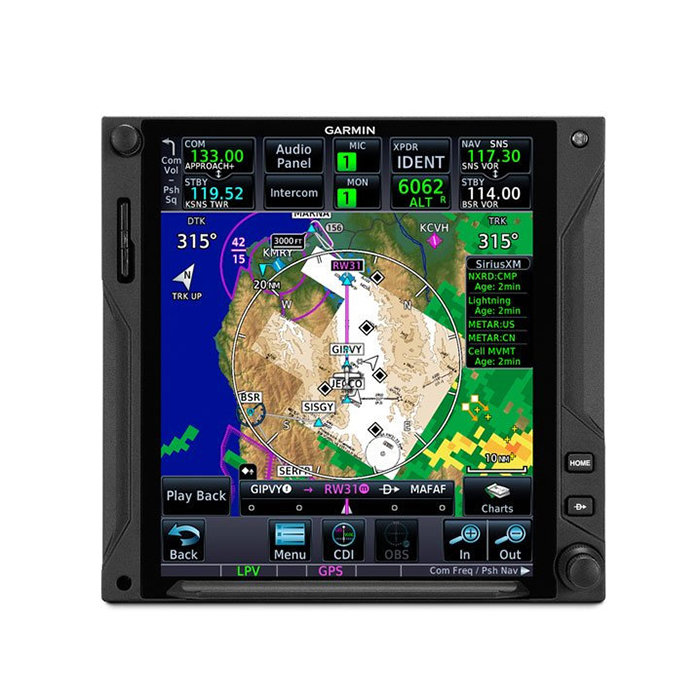

Picture of product GTN-750Xi
Part #: 011-04634-00
Model: GTN-750Xi
Desc: Touchscreen WAAS GPS/NAV/COMM
OEM: Garmin
NSN: 5826-01-689-7456
Sched-B: 8526910010
ECCN: 7A994
Cage Code: 0TRC3
Part Number :
Garmin Logo


GTN 750Xi

FEATURES

  • 6" Touchscreen WAAS GPS/NAV/COMM with Multifunction Display capabilities
  • Designed as a direct slide-in upgrade to the original GTN750 display
  • Do-it-all touchscreen - Intuitive touchscreen interface provides quick access to navigation, radio tuning
  • Lightning-fast response - Powerful dual-core processors boost the GTN Xi series graphical display capabilities - with faster zooming, panning and map rendering on the display
  • High-resolution display - With almost double the pixel count of its predecessor
  • "TELL IT, TUNE IT" voice control technology
  • PINCH, SWIPE GESTURES quick finger swipe lets you pan across the map display
  • QUICK PAGE ACCESS VIA KNOBS, dual concentric knob controls
  • EASY DATA ENTRY,on-screen QWERTY keyboard or traditional concentric knobs to enter frequencies, waypoint identifiers, routings
  • REMOTE RADIO CONTROL, dual GTN Xi installations, with remote tuning capabilities
  • Virtual map topography, built-in terrain, mapping and obstacles databases
  • Direct-to key on the bezel
  • VHF NAVAID capability
  • Built-in COMM Transceiver 
  • Radar Altimeter - when paired with a GRA 55
  • Search and rescue aerial surveillance
  • HTAWS alerting - audible altering & five-color map shading, with voice callouts on descent below 500
  • Onboard Radar - To scan your own storm cells
  • SiriusXM service - When paired with an optional GDL 69 datalink receiver
  • Safetaxi database - Upon landing
  • Active traffic solutions - For more advanced traffic surveillance capability


SPECIFICATIONS

Dimensions: 6.25"W x 6.00"H x 11.25"D Display Size: 6.9" diagonal
Display Resolution: 834 pixels W x 986 pixels H Weight: 7.1 lbs
input voltage range: 11 VDC - 33 VDC Operating Temperature range: -20°C to 55°C
Number of GPS Channels: 15 (12 GPS and 3 GPS/WAAS/SBAS) LAT/LON position accuracy: <1.25 meter RMS horizontal, <2 meter vertical, with WAAS
Maximum velocity: 1,166 knots Position update interval: 0.2 secs (5 Hz)
TSO Applicability: C34e; 2C34f; C36e Class A; 2C36f Class A; C40c; 2C40c; C74d Class A; C112e; C128a; 2C128; C146e Class 3; C151d Class A, B; C157b Class 1, 2; 165b; C169a Class C, E, 3, 4, 5, 6; 2C169a Class C, E, H2, 3, 4, 5, 6; C194; C195b Class B1, B3, B5, B7; C209
Part Number: Description:
010-02002-03 Touchscreen, Black, Unit Only with Info Kit
010-02002-33 Touchscreen, Gray, Unit Only with Info Kit
010-02002-63 Touchscreen, Helicopter NV Version, Black, Unit Only with Info Kit
011-04634-61 Touchscreen WAAS GPS/NAV/COMM GPS Navigator (Helicopter, NVIS-B)


010-02002-01
- Touchscreen GPS/Com/Nav (Black)
Price Condition Status
REQUEST NEW OUTRIGHT REQUEST LEAD TIME
010-02002-02
- Touchscreen GPS/Nav/Comm (NVG Capable)
Price Condition Status
REQUEST NEW INSTALL ONLY
010-02002-03
- Touchscreen GPS/Nav/Com (Black, Unit Only)
Price Condition Status
REQUEST NEW OUTRIGHT REQUEST LEAD TIME
010-02002-05
- Touchscreen GPS/Com/Nav (Black)
Price Condition Status
REQUEST NEW INSTALL ONLY
010-02002-06
- Touchscreen GPS/Nav/Comm (NVG Capable)
Price Condition Status
REQUEST NEW OUTRIGHT REQUEST LEAD TIME
010-02002-07
- Touchscreen GPS/Nav/Com (Black, Unit Only)
Price Condition Status
REQUEST NEW OUTRIGHT REQUEST LEAD TIME
010-02002-31
- Touchscreen GPS/Com/Nav (Gray)
Price Condition Status
REQUEST NEW OUTRIGHT REQUEST LEAD TIME
010-02002-33
- Touchscreen GPS/Nav/Com (Gray, Unit Only)
Price Condition Status
REQUEST NEW OUTRIGHT REQUEST LEAD TIME
010-02002-35
- Touchscreen GPS/Com/Nav (Gray)
Price Condition Status
REQUEST NEW OUTRIGHT REQUEST LEAD TIME
010-02002-37
- Touchscreen GPS/Nav/Com (Gray, Unit Only)
Price Condition Status
REQUEST NEW OUTRIGHT REQUEST LEAD TIME
010-02002-60
- Touchscreen GPS/Nav/Comm (Black, Unit Only)
Price Condition Status
RFQ RFQ RFQ
010-02002-62
- Touchscreen GPS/Nav/Comm (NVG Capable)
Price Condition Status
REQUEST NEW INSTALL ONLY
010-02002-66
- Touchscreen GPS/Nav/Comm (NVG)
Price Condition Status
REQUEST NEW OUTRIGHT REQUEST LEAD TIME
010-02002-67
- Touchscreen GPS/Nav/Comm (NVG Capable)
Price Condition Status
REQUEST NEW OUTRIGHT REQUEST LEAD TIME
011-04634-00
- WAAS GPS/Nav/Comm

NSN: 5826-01-689-7456

Price Condition Status
REQUEST SV OUTRIGHT REQUEST LEAD TIME
REQUEST SV EXCHANGE REQUEST LEAD TIME
011-04634-01
- WAAS GPS/Nav/Comm (Black)
Price Condition Status
REQUEST SV OUTRIGHT REQUEST LEAD TIME
REQUEST SV EXCHANGE REQUEST LEAD TIME
011-04634-30
- GPS/Nav/Comm (Gray)
Price Condition Status
RFQ RFQ RFQ
011-04634-31
- Touchscreen GPS/Nav/Comm (Gray)
Price Condition Status
REQUEST SV OUTRIGHT REQUEST LEAD TIME
011-04634-60
- GPS/Nav/Comm (NVIS-B)

NSN: 5826-01-716-9193

Price Condition Status
RFQ RFQ RFQ
011-04634-61
- GPS Navigator (Helicopter, NVIS-B)
Price Condition Status
RFQ RFQ RFQ

Click on a question below to see the answer. If you have a question about this model that is not answered below, please contact questions@seaerospace.com

The GTN Xi navigators provide several improvements over the original GTN navigators including a dual processor and updated LCD screen.

The upgraded processor enables the Xi to be faster than the original GTN. The updated screen improves the resolution from 134 DPI to 187 DPI.

Some of the other minor differences include:

  • Location of buttons on the Xi were moved closer to the bottom right knob
  • All databases stored internally on the Xi
  • The Xi is lighter in weight
  • The Xi draws less current


In relation to NE (New) parts, many OEMs change their prices and availability without any notice to dealers or the industry. Therefore, through the REQUEST or RFQ indication, we ask that customers contact us for the most accurate price and availability.

In relation to SV & OH parts, the used parts aftermarket in the aviation industry is not an infinite supply. It is a dynamic, constantly changing market that is significantly affected by and susceptible to highs and lows in supply and demand. Therefore, although we attempt to, at times, we are unable to predict the exact moment when an item may be available. Once again, through the REQUEST or RFQ indication on our website, we ask that customers contact us for the most current and accurate price and availability.

Garmin has provided Service Advisory 2051 for general recommendations, materials, and supplies to clean and disinfect Garmin products. Otherwise, not following the recommendations could void the warranty.

  • Cleaners containing ammonia will harm the anti-reflective coating on many Garmin aviation display lenses.
  • Disinfectant with a solution of 70% isopropyl alcohol that does not contain ammonia is preferred. Solutions of up to 91% isopropyl alcohol are also acceptable.
  • Clean the display lens using a clean lint-free cloth and a cleaner that is specified as safe for anti-reflective coatings.
  • For other exposed surfaces such as knobs, buttons, and bezels, a damp cloth with soap and water is acceptable.
  • Bleach-based cleaners, ammonia-based cleaners, or other harsh chemicals on any surface are not recommended.
  • Remove all soap/soap residue to prevent buttons and knobs from gumming up or becoming slippery.
  • Many aviation products are not rated as waterproof. Spraying or wetting the units to the extent where moisture could go beyond the exterior surfaces could damage the unit.

Click on a headline below to see more:


GTN Xi Series Main Software Version 21.12 contains the following changes. 

Compliance with this software update is recommended at the next maintenance interval.


New Interfaces

  • Added support for AXIS™ Flight Displays

Flight Planning & Navigation Enhancements

  • Added Destination Descent feature to assist with descent planning
  • Added landing weight calculator to fuel planning page
  • Added off route Direct-To waypoints to the flight plan if the flight plan does not contain an active leg
  • Added Flight Plan Suspend/Unsuspend button to the flight plan page button bar
  • Added option to designate a waypoint as fly-over on the flight plan waypoint menu
  • Changed the default fly-by-bank angle back to 15 degrees to be consistent with other cross-side navigators
  • Increased roll steering turn rate limit to 10 degrees per second during Search and Rescue, 5 degrees per second during Smart Glide™ Engine-Out Navigation, and 3.5 degrees per second for all other cases
  • Expanded the Search and Rescue feature to include the Creeping Ladder pattern, and added new configurable parameters for the Sector Search pattern allowing for radial and angular spacing and including a second pass

Approach and Procedures Enhancements

  • Improved visual approaches to:
    • Allow selection of approach angle and final leg distance
    • Provide advisory vertical guidance when terrain clearance is determined for glidepaths below the maximum approach angle
    • Incrementally increase the final approach leg glidepath angle up to the maximum configured approach angle
  • Changed button text to activate an approach from ‘Load Approach & Activate’ to ‘Activate VFT’ when on the Procedures and Flight Plan pages, and to ‘Activate Direct-To X’ where ‘X’ is the given transition when on the Approach Procedure page
  • Changed the runway selection button text from ‘ALL’ to ‘NONE’ on the Flight Plan page procedures header
  • Changed the main map menu option for Constraints from ‘Selected & Active’ to ‘Next & Selected’
  • Improved destination airport selection. If an on-route Direct-To is set to an airport after an approach/arrival procedure, then it becomes the destination airport
  • Enabled the Chart button on the Procedures page and Flight Plan options popup if an information chart exists for the airport procedure

Smart Glide Enhancements

  • Added descending circling capability
  • Improved selection of suitable airports using runway thresholds instead of only using the airport fix
  • Added new visual and aural alert when an airport comes into range if one had not been available when Smart Glide was activated
  • Added Runway lighting state to nighttime determination of best airport
  • Changed ‘No Airport’ message to ‘No Suitable Airport’
  • Improved the Best Glide indicator line
  • Improved the Map display so that the Non-Directional Beacon (NDB) overlay is turned off and METAR overlay is turned on when Smart Glide activates
  • Added support for the Direct-to button to activate Smart Glide when a Smart Glide switch is also installed
  • Improved inconsistent confirmations when deactivating Smart Glide
  • Added Smart Glide Data to flight data logs

CPDLC Enhancements

  • Disabled the Preview button on the CPDLC thread popup after a WILCO is sent
  • Added an indication of the validity of displayed SIGMET/AIRMET weather data to the FAA Data Comm import preview map
  • Added ability to crossfill downlink messages between GTN 725Xi/750Xi units
  • Added ability to include climbing/level/descending when responding with a position report (DM48)
  • Added ability for COM and Transponder frequencies to be automatically imported from UM117, UM120, and UM123
  • Added text to the message thread if downlink message failed to send
  • Added a message to the ATC Datalink page to indicate when GTN Xi does not have valid GPS fix

Other User Interface & Feature Enhancements

  • The map now shows the active flight plan in gray when an off-route direct-to is active
  • System messages now include key shortcuts to applicable pages
  • ‘Fuel on Board’ was renamed to ‘EST Fuel Remaining’ when displaying data from the fuel sensor
  • Flight plan preview maps can now be resized to full page
  • Weather radar information is now removed from waypoint information preview maps
  • GPS Status page now shows Satellite Vehicle Identification (SVID) without an offset value
  • Added a new system message when one or more SBAS options have been disabled by the user. A ‘SBAS Providers’ button is available with the system message to provide quick access to the SBAS Providers menu to toggle on the SBAS provider
  • Moved the ‘Date/Time’ and CDI settings to sub-pages in GTN 725Xi/750Xi
  • Adjusted the limits for the time-zone offset setting to be +14 and -12
  • Removed the 5-minute delay after power up before showing LOI annunciation. LOI annunciation now displays at power up until GPS is acquired
  • Improved the OBS/Selected course behavior between GTN Xi and G500/G600/G700 TXi
  • COM1/NAV1 and COM2/NAV2 active and standby frequencies are now added to the flight data logs
  • Expanded the startup database information page to include GPS 175 and GNC® 355 Radio

Software Corrections

  • Corrected an issue where VNAV vertical guidance was being disabled when the aircraft was within 75 feet of the FAF altitude

CPDLC Related Software Corrections

  • Corrected an issue where some aircraft with tail numbers composed of fewer than six characters were preventing FAA Data Comm from logging on
  • Corrected the annunciator self-test so that it tests the CPDLC switch/annunciator

Config Mode Changes

  • Corrected an issue related to not being able to enable charts in configuration mode
  • Expanded some config mode settings to include an information icon when they are disabled. Pressing the button displays additional information on why the setting is disabled
  • Moved System ID and Airframe type configuration settings from GTN Setup - Main System page to a new System Setup page
  • Added support for loading configuration files
  • Added configuration settings for AXIS
  • Added configuration restriction of GDR™ 66 Remote-Mounted Digital Communication Transceiver to GTN 1
  • Corrected the traffic settings reported on the configuration summary
  • Changed Glide Range Ring to be automatically enabled when valid values are entered for Glide Speed and Glide Ratio
  • Added configuration option to set a maximum allowed visual approach angle
  • Added GWX™ 75/8000 Weather Radar antenna size to GWX configuration page